

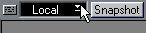
1. Pull down the pop-up menu in the upper left corner of the Mixer window and select “Local” (not “Write” or “Replace”).
This is to make sure your action does not get recorded. If you do want to record your “playing”, see page 13.
 2. Open the Toolbox by right clicking somewhere in the Mixer, and select the Play tool.


• If the Object is an On/Off Switch you change its state by clicking on it.
Some Objects can be Masters, that is they control other Objects. See page 30.
Describe what you're looking for in as much detail as you'd like.
Our AI reads your request and finds the best matching books for you.
Popular searches:
Join 2 million readers and get unlimited free ebooks