

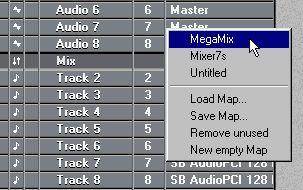
Setting a Track to use a loaded map.
2. Create at least one Part on the Track.
The Mixer window with the map appears.
1. Open the Mixer Map pop-up menu from the Track Output or the Inspector.
2. Select “New empty Map”.
3. Create at least one Part on the Track.
4. Double click on the Part.
The Mixer window with the empty map appears. You can now create Objects, rename the map and save it to disk.
Describe what you're looking for in as much detail as you'd like.
Our AI reads your request and finds the best matching books for you.
Popular searches:
Join 2.9 million readers and get unlimited free ebooks