

• VST-native Plug-ins.
These are effect plug-ins in VST’s “own” format, and can be used with all VST-compatible programs such as Steinberg’s Cubase VST and WaveLab.
• DirectX Plug-ins.
Microsoft DirectX is a set of standards and routines for handling various kinds of multimedia under Windows and Windows NT. DirectX plug-ins can be used with many different programs and applications, including Cubase VST.
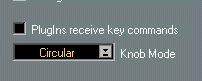
In the Preferences-General-General dialog on the Edit menu, you will find a checkbox called “Plug-ins receive key commands”. If this checkbox is activated and a plug-in window is the active window, most key commands you use will be directed to the plug-in instead of to Cubase.
For example, some plug-ins may require that you enter numerical values. Normally, the numerical keys would serve as transport control shortcuts in Cubase, but with this checkbox activated (and the plug-in window active) the key commands are directed to the plug-in instead.
P Some computer keystrokes will not be re-directed to the plug-ins, regardless of the “Plug-ins receive key commands” setting. These are: Numeric Enter, Numeric 0, Numeric 1, Numeric 2, Page Up and Page Down.
Describe what you're looking for in as much detail as you'd like.
Our AI reads your request and finds the best matching books for you.
Popular searches:
Join 2.9 million readers and get unlimited free ebooks