

P This function makes permanent changes to your notes!
The Process Dynamics dialog appears.
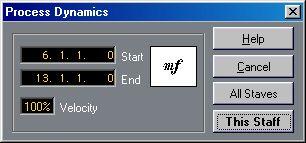 2. Use the Start and End values to specify the range to which the velocity change should be applied.
3. Use the Velocity value to set up the amount of Velocity change you want to apply to the note(s) in the range.
The value is defined as a percentage of original velocity.
Describe what you're looking for in as much detail as you'd like.
Our AI reads your request and finds the best matching books for you.
Popular searches:
Join 2.9 million readers and get unlimited free ebooks