

1. Create a UDF (User Defined Function)
To create this Function, execute the following steps
Use the If Then statement in Excel VBA code lines function to act if any of 2 specific condition is met. Insert the below code in a New Module
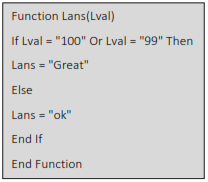
This Will Create A new UDF (User Defined Function) with name Lans(Lval) we Can use this As we Required. type in Excel the function = Lans(Lval) ,the UDF Comesup in small letter’s to differentiate itself from “tandard Excel Formula
This Code lines will create function Lans()
In Cell B1 Type
= Lans(A1)

2. Use Excel Formulas (IF) Syntax
IF(logical_test, value_if_true, [value_if_false])
=IF(A1=100,"Great", IF(A1=99,"Great","ok") )
OR(logical1, [logical2], ..
=IF(OR(A1=100,A1=99),"Great","ok")
Describe what you're looking for in as much detail as you'd like.
Our AI reads your request and finds the best matching books for you.
Popular searches:
Join 2 million readers and get unlimited free ebooks