

1. Create a UDF (User Defined Function)
To create this Function, execute the following steps
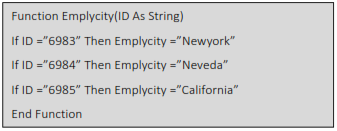
This Will Create A new UDF (User Defined Function) with name Emplycity,we Can use this As we Required. now type in Excel the function =Emplycity ,the UDF shows in small letter to differentiate itself from Standard Excel Formula
This Code lines will create function Emplycity ()
In Cell C1 Type
= Emplycity (A1)
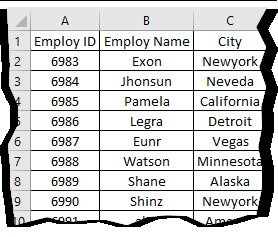
2. Use Excel Formulas (Lookup,Vlookup) Syntax
LOOKUP(lookup_value, array)
=LOOKUP(6983,A1:C10) ,
Excel will perform search to find out the city of the employeeID 6983
Syntax
VLOOKUP (lookup_value, table_array, col_index_num, [range_lookup])
=VLOOKUP(6983,A1:C10,3,TRUE)
Excel will perform search to find out the city of the employeeID 6983
Describe what you're looking for in as much detail as you'd like.
Our AI reads your request and finds the best matching books for you.
Popular searches:
Join 2.9 million readers and get unlimited free ebooks