

Exercise 22: Column Width function
To create this Function, execute the following steps
1. Create a UDF Columnwidth() ( User Defined Function)

This Code lines will create function Columnwidth() In Cell B1 Type
=Columnwidth(A1)
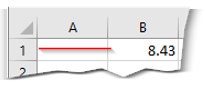
In Excel Sheet
click on  Home Cells Format Column width to know the size of the Column
Describe what you're looking for in as much detail as you'd like.
Our AI reads your request and finds the best matching books for you.
Popular searches:
Join 2 million readers and get unlimited free ebooks