

Exercise 11 : Create simplified Vlookup version
1. Create a UDF Vlkup( User Defined Function)
To create this Function, execute the following steps

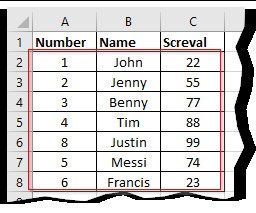
Define Name With Below Range score :A2:C8
Syntax
VLOOKUP (lookup_value, table_array, col_index_num, [range_lookup])
=VLOOKUP(8,score,3,FALSE)
Describe what you're looking for in as much detail as you'd like.
Our AI reads your request and finds the best matching books for you.
Popular searches:
Join 2 million readers and get unlimited free ebooks