

Excel VBA formulas for Spreadsheet by Sharath Kumar Peechara - HTML preview

PLEASE NOTE: This is an HTML preview only and some elements such as links or page numbers may be incorrect.
Download the book in PDF, ePub, Kindle for a complete version.

Exercise 7:Simple Multiplication


To create this Function, execute the following steps

  1. Open Excel VBA (Alt + F11)
  2. Insert a New Module
  3. In the Project Explorer, double click on the Module
  4. Add the following code line:

img13.png

This Code lines will create function Multiply()

In Cell C1 Type

= Multiply(A1,B1)
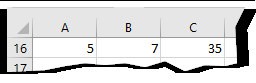
img14.jpg

2. Use Excel Formulas

=A1*B1

Find Your Next Great Read

Describe what you're looking for in as much detail as you'd like.
Our AI reads your request and finds the best matching books for you.

Showing results for ""

Popular searches:

Romance Mystery & Thriller Self-Help Sci-Fi Business