

You might put together a prospectus using a template (see chapter on templates), and add your own logo and some charts.
Then, PDF it using the sources recommended above!
I should point out that you can also import graphs from most any other type of document.
Let’s say you created a chart in excel.
What you would do is first create a text box, then copy and paste the chart into that text box.
Remember as I mentioned earlier…the text box feature
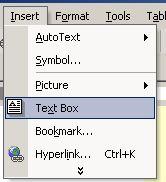 This is key to adding pictures and charts to your Word documents.
 Once they are in a text box, you can drag em around anywhere in your document or use the arrow keys to move the box around the page.
This makes for a powerful graphic design program…especially because when you print it, it will print out the way you want it to.
Describe what you're looking for in as much detail as you'd like.
Our AI reads your request and finds the best matching books for you.
Popular searches:
Join 2 million readers and get unlimited free ebooks